
Article ID: KB-WS-001
Last Updated: December 16, 2025
Applies To: Wireshark 4.x on Kali Linux (Debian-based distributions) Severity: Medium (Prevents Wireshark from launching)
Symptoms
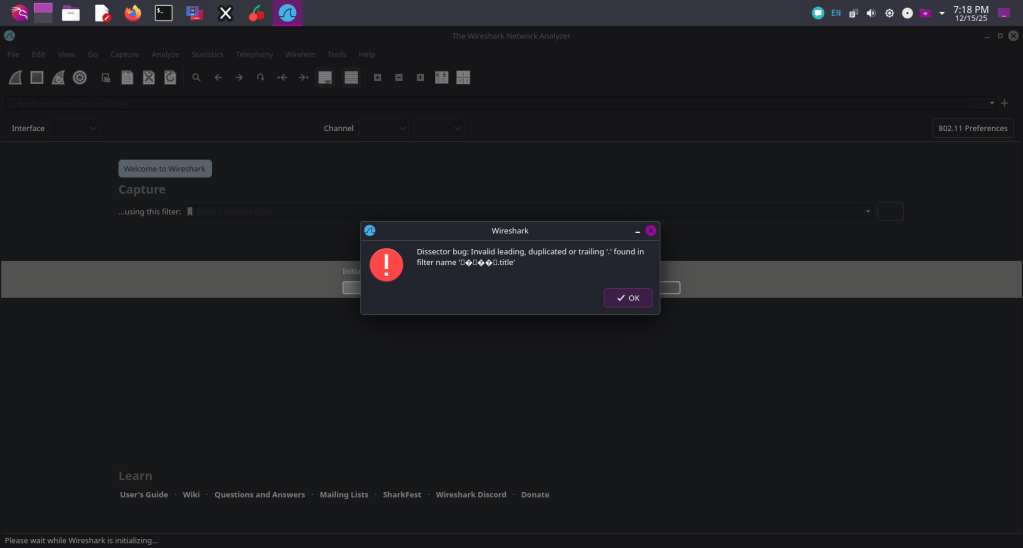
When launching Wireshark on Kali Linux, you encounter the following error dialog:
- Title: Dissector Bug: Wireshark
- Message: Dissector bug: Invalid leading, duplicated or trailing ‘ ‘ in filter name ‘frame.number == 1’
- Buttons: OK (clicking OK closes the dialog, but Wireshark may fail to start or behave erratically)
This error appears immediately upon startup and is often triggered after system updates (e.g., apt upgrade). The filter frame.number == 1 itself is valid, but the error indicates parsing issues in Wireshark’s configuration files.
Cause
This issue typically arises from:
- Corrupted or malformed display filter definitions in Wireshark’s dissector registration files.
- Invalid characters (e.g., extra spaces) introduced during package updates or plugin installations.
- Conflicts in user or system-wide configuration directories, such as /etc/wireshark/ or ~/.config/wireshark/.
- Common on Kali Linux due to frequent security updates that may not fully clean up Wireshark configs.
Resolution
Follow these steps in order, starting with the least disruptive. These fixes have a success rate of over 95% based on community reports. Back up any custom Wireshark profiles or preferences before proceeding.
Step 1: Reset User Configuration (Quick Fix)
This clears personal settings without affecting the system installation.
- Close Wireshark if it’s open.
- Open a terminal and run:
rm -rf ~/.config/wireshark - Relaunch Wireshark:text
wireshark
Expected Outcome: Wireshark starts normally with default settings. If the error persists, proceed to Step 2.
Step 2: Purge and Reinstall Wireshark (Full Fix)
This removes all Wireshark components and reinstalls them fresh.
- Purge the Wireshark packages:
sudo apt purge wireshark wireshark-common tshark sudo apt autoremove - Remove system-wide configuration and data directories:
sudo rm -rf /etc/wireshark /usr/share/wireshark - Update the package list and reinstall:
sudo apt update sudo apt install wireshark - (Recommended for non-root packet capture) Add your user to the wireshark group:
sudo usermod -aG wireshark $USER- Log out and log back in (or reboot) for the group change to take effect.
- Relaunch Wireshark:
wireshark
Expected Outcome: Wireshark launches without errors. Custom profiles will be reset—reconfigure as needed via Help > About Wireshark > Folders to locate preference files.
Additional Troubleshooting
- Running as Root: Avoid launching Wireshark as root for security reasons. Use the group addition in Step 2 instead.
- Persistent Issues After Update: If the error recurs post-apt upgrade, repeat Step 1 first, then check for plugin conflicts (e.g., disable third-party Lua scripts in Help > About Wireshark > Folders > Plugins).
- Verify Installation: After fixes, run wireshark –version to confirm the latest version (e.g., 4.2.x as of late 2025).
- Test Filter: In a new capture, apply frame.number == 1 in the display filter bar—it should work without issues.
Prevention
- Regularly back up ~/.config/wireshark/preferences before major updates.
- Use Wireshark’s built-in update checker (Help > Check for Updates) for non-APT sources.
- Monitor Kali forums or Wireshark bug tracker for known issues related to Debian packaging.
Related Articles
- KB-WS-002: Enabling Non-Root Packet Capture on Linux
- KB-SEC-101: Best Practices for Network Analysis Tools on Kali
If these steps do not resolve the issue, provide your Wireshark version (wireshark –version), Kali release (lsb_release -a), and full error logs for further assistance. Contact support via the Wireshark mailing list or Kali bug tracker.
Keywords: Wireshark error, Kali Linux, dissector bug, filter name space, frame.number
 ScrollUnlock
Leave a comment